

There are two ways to share product links, depending on how long access is needed.
Option 1: Share a Link for Up to 15 Days
Use the LINK feature for quick and easy access. On the product page, click the chain-link icon located below the product description, as shown below.
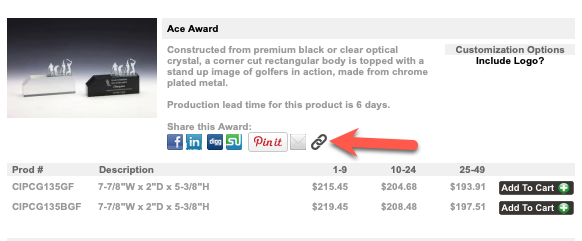
The LINK feature generates a URL that you can copy and paste into an email. The recipient can simply click the link to view the product.
Important: LINK-generated URLs expire after 15 days.
Use this option when the customer only needs short-term access.
Option 2: Share a Permanent Link
If the link needs to remain accessible for more than 15 days, send the product’s permanent URL.
- Navigate to the product and copy the permanent URL from your browser’s address bar.
- Paste the URL into your email.
- Instruct the customer to first visit yourwebsite.com.
- The customer can then copy the permanent URL from the email and paste it into the same browser.
Important: Permanent links do not expire, but the recipient must visit yourwebsite.com first. Opening the permanent link directly may result in a 403 error.
If a Customer Sends You a Permanent Link
If a customer emails you a permanent product link:
- First, open yourwebsite.com in your browser.
- Return to the customer’s email and copy the product link.
- Paste the link into the same browser and press Enter.
Do not click the permanent link directly from the email. Visit yourwebsite.com first, then copy and paste the link into your browser to avoid a 403 error.
Quick Reference
LINK feature — Click the chain-link icon on the product page. Provides easy one-click access and expires after 15 days.
Permanent link — Copy the URL from your browser’s address bar. It does not expire, but the recipient must visit yourwebsite.com first before copying and pasting the URL.
Receiving a permanent link — Visit yourwebsite.com first, then copy and paste the link provided by the customer.